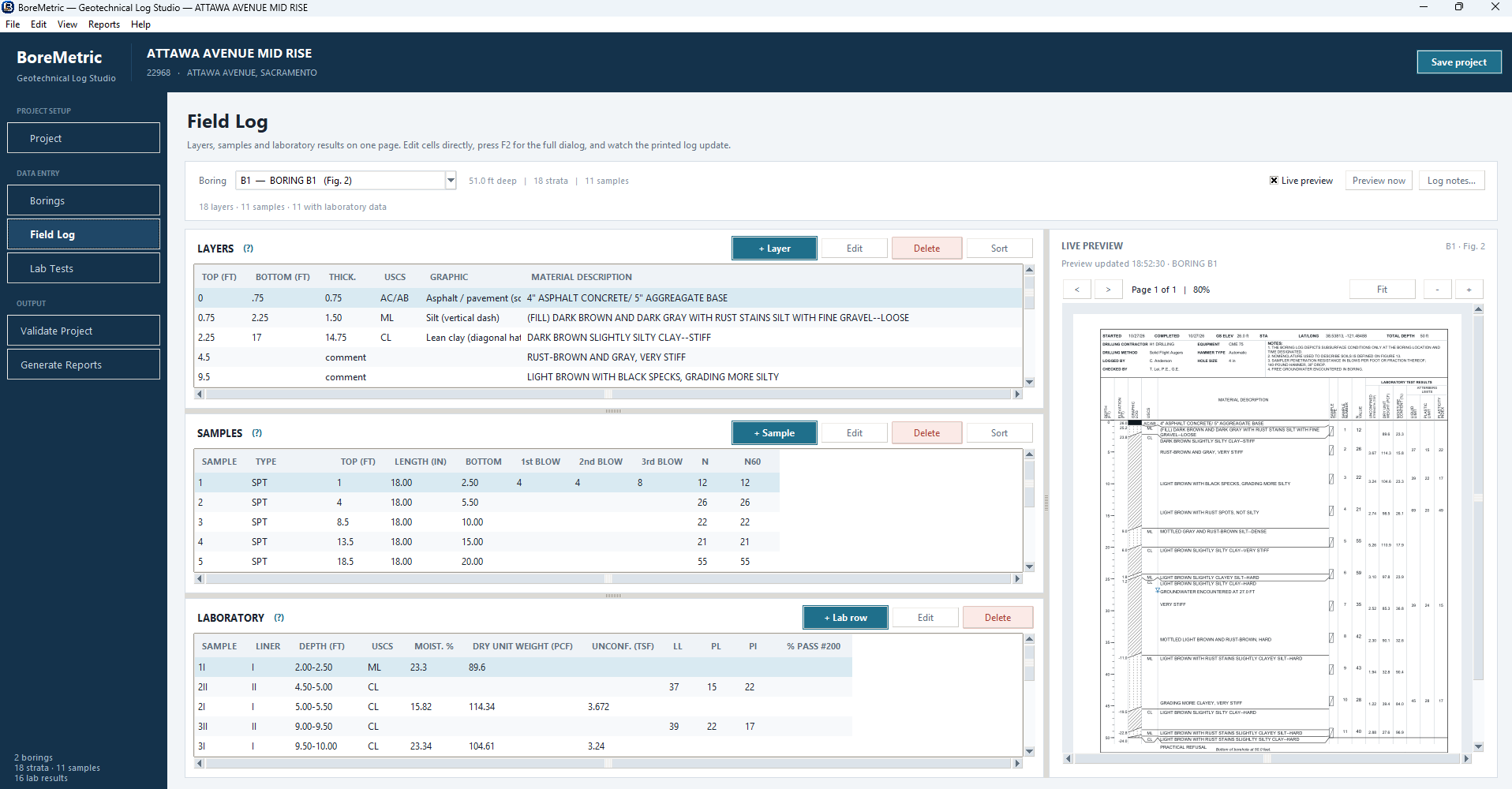
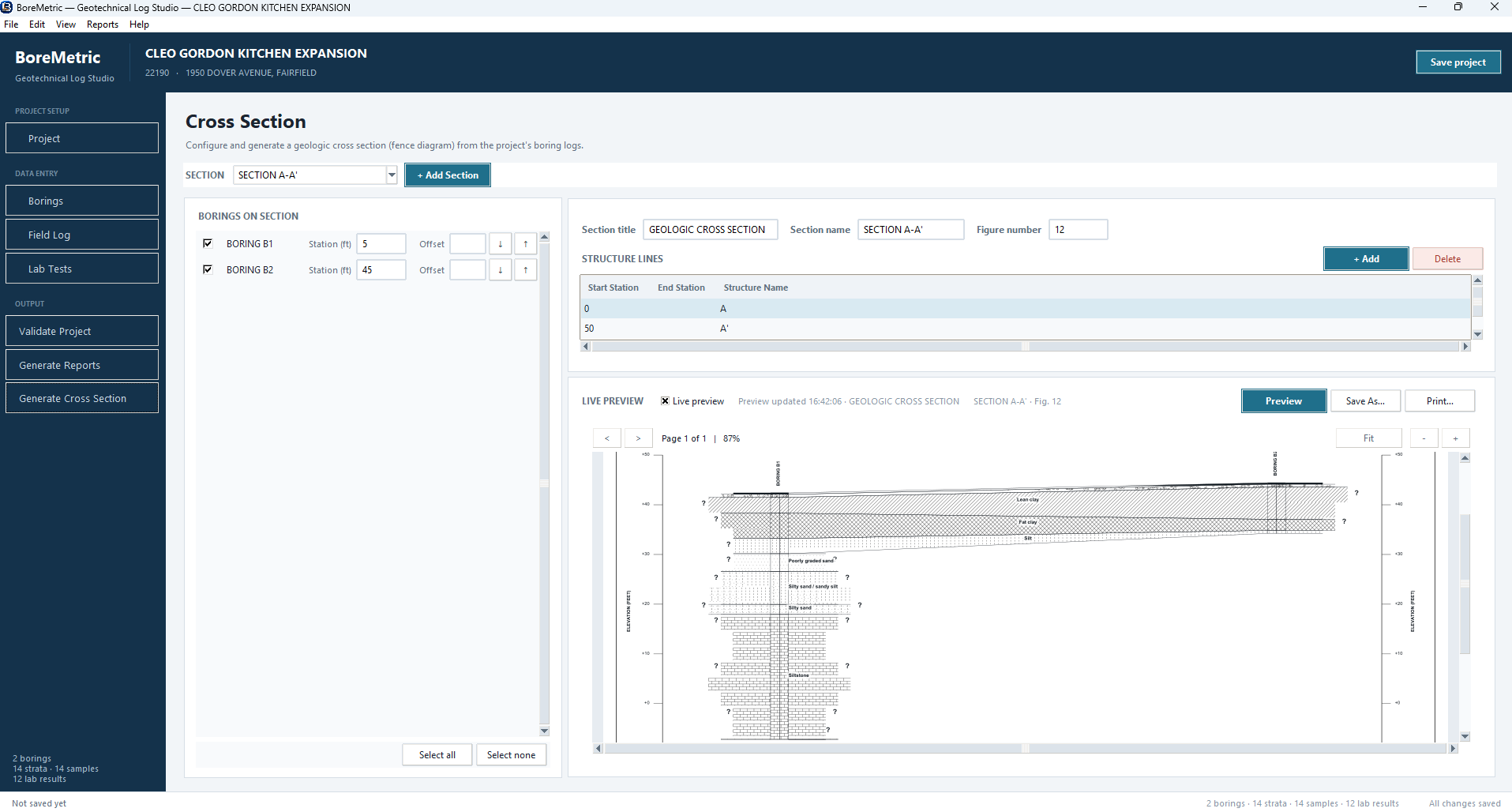
BoreMetric is a Windows desktop application for storing geotechnical boring and laboratory data and producing professional PDF boring logs, laboratory summary reports, and cross sections โ straight from your project data.
Enter layers, samples and lab results beside a live PDF preview.
Three stacked grids per boring โ Layers, Samples and Laboratory Results. Edit cells in place and watch the printed log refresh in the preview pane.
Portrait boring logs, landscape laboratory summaries, Key to Symbols, Atterberg limits and No. 200 sieve sheets matching your reference figure geometry.
Moisture, dry unit weight, Atterberg limits, unconfined strength and % passing No. 200 โ plus optional categories you enable per project.
Encountered and stabilized depths with conventional water-table symbols, plus automatic N60 correction per sampler/liner.
Save as .boremetric project files. Export boreholes, strata and samples to CSV.
Runs on Windows 10/11. Distributed as a standalone .exe installer โ nothing to build, nothing to configure.
Both editions require an annual subscription and include software updates for the term.
One seat on one Windows machine. Boring logs and laboratory summary reports.
One seat on one Windows machine. Everything in BoreMetric 1.0, plus cross section profile fence diagrams.
Annual volume licensing for teams and engineering firms. Choose BoreMetric 1.0 or 2.0 per seat.
Subscription required. BoreMetric is commercial software distributed under an annual subscription license.
A typical geotechnical workflow in BoreMetric.
Enter project name, number, client, location, company logo, report defaults and reference figure numbers.
One record per boring โ IDs, dates, elevation, coordinates, total depth, drilling equipment and groundwater readings.
Enter layers, samples and lab results on the Field Log beside a live PDF preview. Validate before reporting.
Preview and save PDF boring logs, laboratory summaries and companion sheets in one step.
Upgrade to BoreMetric 2.0 to generate cross section profile fence diagrams from your boring data.
The PDF outputs BoreMetric produces.
One US Letter portrait page per boring, split over multiple pages for deep borings, with laboratory columns for strength, unit weight, moisture and Atterberg limits.
Landscape page(s) listing every sample with only the laboratory categories enabled in your catalog.
Only the sampler and USCS lithologic symbols actually used by your project's borings, plus abbreviations and hatch legend.
Liquid-limit vs. plasticity-index chart with the A-line, U-line, legend and sample table.
Portrait sieve sheet with one row per sample that has an explicit % passing No. 200 result.
Upgrade to BoreMetric 2.0 to generate cross section profile fence diagrams from your boring data.
BoreMetric runs on Windows 10/11 and is distributed as a standalone .exe installer. Choose from two editions; an annual subscription is required to use the software.
No account required. Subscription includes software updates for one year.